Asset Manager Pro - Asset Transaction List Report
Transaction List Report
Product and Upgrade Info
Product: AssetManager Pro
Versions: 2017 (v6)
MYOB Upgrade Info: Includes NEW formatted MS Excel output
Overview
The Transaction List Report displays a list of asset transactions and their values. Filtering is for a range of assets, date range (within current year) and transaction type.The report can be displayed to screen, printed or extracted in MS Excel format.
Report Access
For information on how to access reports via the Index to Reports or via the AssetManager Pro Analyst click here.
Output Options
- Screen
- Print
- MS Excel
Filter Options
- Selected Asset Range (Select by Asset ID or Name)
- Report Period (Specific Data Range within Current Year)
- Transaction Type (Asset Acquisitions, Asset Disposals, Asset Write-Offs, Asset Revaluations, Balancing Charge, Pool Transactions, Second Element of Cost)
Report Level/Grouping Options
- None
Report Columns/Data
| Column/Data | Output Info |
|---|---|
| Date | Transaction Date (In DD/MM/YYYY format) |
| Asset ID | Up to 10 character Asset ID |
| Asset Name | Up to 50 character Asset Name |
| Transaction Type/Transaction Description | Asset Acquisitions, Asset Disposals, Asset Write-Offs, Asset Revaluations, Balancing Charge, Pool Transactions, Second Element of Cost, Assign to Low Value Pool. |
| Value | Value of the Transaction |
Excel Output
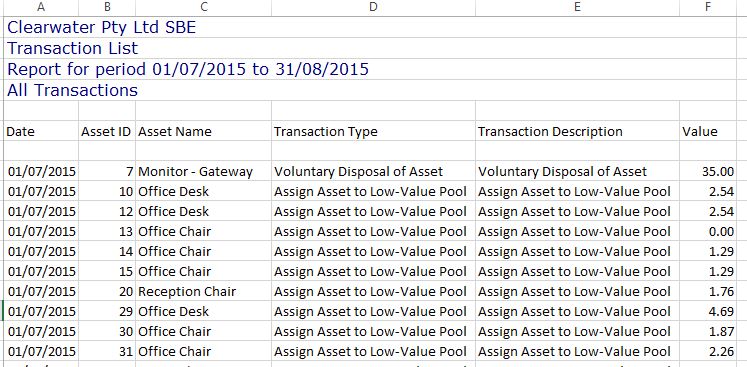
| Column/Data | Output Info |
|---|---|
| Date | Transaction Date (In DD/MM/YYYY format) |
| Asset ID | Up to 10 character Asset ID |
| Asset Name | Up to 50 character Asset Name |
| Transaction Type/Transaction Description | Asset Acquisitions, Asset Disposals, Asset Write-Offs, Asset Revaluations, Balancing Charge, Pool Transactions, Second Element of Cost, Assign to Low Value Pool. |
| Value | Value of the Transaction |